The Sysinternals set of freeware utility programs is a great software package. Once you have started using them it is almost impossible to get along without them.
Whenever I get to a new PC, one of the first things I do is to install e.g. the Process Explorer from Sysinternals. However, installation always requires some manual operations as the programs are delivered in zip-files and without installation programs. Another issue for lazy people like me is that the author Mark Russinovich quite often update the programs with new great functionality and checking for this and doing the manual update can be a bit tedious.
Due to this I created SISetup, a small program which facilitates installation of an arbitrary number of the Sysinternals utilities. Once installed it is also very easy to check for updates of these programs and when available the update will be installed automatically. I also wanted the program to be as simple as possible with no fuzz and to run without any prerequisites i.e. unzipping of the packages should be made by the program itself. The program is quite small, < 200 KB.
SISetup is now open source and available at GitHub
If you like me are addicted to the Sysinternals utilities you may find use for SISetup.
SISetup runs on any version of Windows, from Windows 95 to Windows 8.1 (32- and 64-bit). Please note however that most Sysinternals programs require at least Windows 2000.
An Internet connection is required when running SISetup.
No specific package download is required, you just start the program from the link below. You can choose to either run the program directly or download it for a first virus check or alike. When starting the program for the first time you will get the usual warnings about running an unsigned application.
SISetup will retrieve it's initial default settings from this site, see more in the technical details section below.
Click here start and install SISetup
Click here if you want the 64-bit version
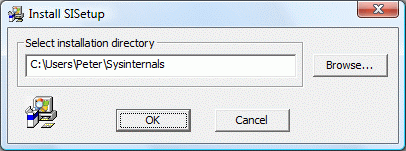
Once started the program will first show a dialog for selection of an installation directory:
For pre-Vista versions of Windows the default root will be the "Program Files" directory. On Vista and later with UAC activated this is not a good location to use as it will require user elevation each time SISetup is launched. In this case the default root is instead the user root directory. Any other directory can however be chosen via the Browse button.
Once the installation directory selection has been done the following dialog is shown:
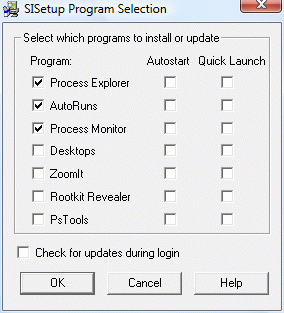
Here you choose which programs to install and if you want them to start
automatically whenever you log onto Windows. It's also possible to make SISetup
create a "Quick Launch" shortcut for the corresponding program(s). This first time the list will
contain a default set of Sysinternals applications. You can modify the list of
applications via the contents of the settings data text file described below.
It is also possible to specify that SISetup should be started and check for updates whenever logging in to Windows. This operation is performed in a silent mode which means that if no updates are available no window will be shown.
Once you press the OK button, SISetup will connect to the
Sysinternals web site and download the specified applications. The packages are
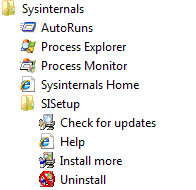
then unzipped and startup menu entries are created for each of the installed programs
in a sub menu named Sysinternals. This menu also contains a sub menu for
SISetup. In there you find entries for checking for updates of the installed
programs, installing more programs and for uninstalling everything, see below.
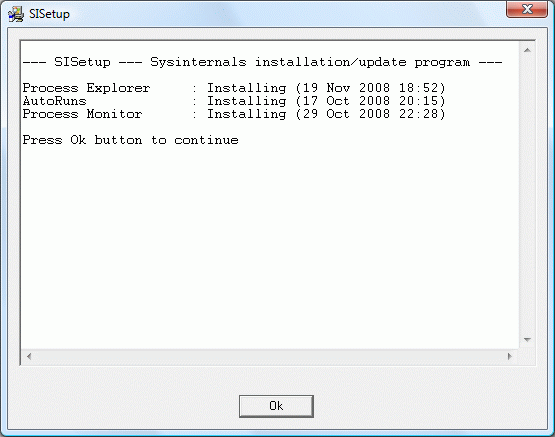
Whenever launched SISetup will display the progress of its operations in a text window:
When the "Install more" entry is selected, the same dialog is shown as during the first installation. When selecting new programs these will be installed. All already present programs will be updated when applicable. If a previously installed program is deselected then it will be removed from the installation.
All installed Sysinternals programs are put in individual subdirectories to the SISetup installation directory.
During any update or installation operation SISetup will normally also check for updates of itself and apply these when applicable. This function can be disabled via the settings data file.
Current version is 1.3.2, dated May 22, 2014.
Version history:
1.3.2 2014-05-22
Downloading of the default settings file and the version check was not working.
This was due to a change of web server for these pages and has now been fixed.
1.3.1 2009-11-30
SISetup now adds an entry to the standard Windows uninstall function.
A registry entry is also added to
avoid the error message from the "Program Compatibility Assistant" in Vista and
later when running the program for the first time.
1.3.0 2009-03-03
Added the possibility to create a startup shortcut which checks for updates in
silent mode whenever logging in to Windows.
1.2.0 2008-12-04
This version has the following new items:
1.1.1 2008-09-24
Just a minor bug-fix update. The main entries in the start menu were not always
updated correctly.
1.1.0 2008-09-18
This version has the following new items:
1.0.1 2008-02-08
This is a minor update of the original 1.0.0 version. It handles the fact that
the files in some of the Sysinternals zip archives now have read-only
attributes. This caused an error during the update operation in the previous
version.
1.0.0 2007-12-09
First public release
SISetup is controlled by a data file named SISetup.txt which is located in the same directory as the program itself. When missing a default one will be retrieved from this site.
The syntax for this file is fairly straightforward, click here to view the default one. Up to 15 Sysinternals utilities can be added.
It is possible to have your own default data file e.g. for a specific set of programs within a group of people. Just place a copy of "SISetup.exe" together with your specific version of "SISetup.txt" to a public directory and let everyone install from there. In this case this version of the data file will be used as the default.
All registry settings and shortcuts are made on user level, hence no admin privileges should be required. The manifest in the SISetup executable stipulates no user elevation in Vista or later.
Possible proxy server settings defined in Internet Explorer are used for SISetup's Internet connection when applicable.
SISetup uses the unzip function from the INFO-zip open source code.
SISetup is freeware i.e. you can use it free of charge and no registration is required.
Please note that SISetup is not connected to Sysinternals or Microsoft in any way.
Any type of feedback as well as support questions can be sent to the author
Peter Lerup at the following address: peter@lerup.com
SINCE THE SOFTWARE IS PROVIDED FREE OF CHARGE, THE INFORMATION AND CODE PROVIDED IS PROVIDED "AS IS" WITHOUT WARRANTY OF ANY KIND, EITHER EXPRESS OR IMPLIED, INCLUDING BUT NOT LIMITED TO THE IMPLIED WARRANTIES OF MERCHANTABILITY AND FITNESS FOR A PARTICULAR PURPOSE. UNDER NO CIRCUMSTANCES SHALL PETER LERUP BE LIABLE FOR ANY INDIRECT, SPECIAL, INCIDENTAL, OR CONSEQUENTIAL DAMAGES OF ANY CHARACTER INCLUDING, WITHOUT LIMITATION, DAMAGES FOR LOSS OF GOODWILL, WORK STOPPAGE, COMPUTER FAILURE OR MALFUNCTION, OR ANY AND ALL OTHER COMMERCIAL DAMAGES OR LOSSES, EVEN IF PETER LERUP HAS BEEN INFORMED OF THE POSSIBILITY OF SUCH DAMAGES, OR FOR ANY CLAIM BY ANY OTHER PARTY.